Description
This plugin allows you to connect to Worx Landroid Wi-Fi models.
Supported Versions
| Component | Version |
|---|---|
| Debian | Bullseye(11) & Bookworm(12) |
| Jeedom | >= 4.5 |
Installation
To use the plugin, you must download, install, and activate it just like any other Jeedom plugin.
Plugin configuration
The connection to the mower is established through a cloud server using the account created when the mower was registered.
The login credentials are the same as those for the mobile app. You must wait until the dependencies have finished installing to enable communication with the mower.
Once the credentials have been saved, the daemon will start and automatically detect your lawn mowers. A new device will be automatically created for each one.
Stopping the daemon disconnects the connection to the mower. If the mower is out of service for an extended period—such as during winter storage—you can disable the daemon (and automatic management) or disable the plugin entirely.
Usage
Default Name = Name of the mower on the mobile app
The dashboard displays:
- Battery status
- “Go Home” button
- start button
- pause button
- Refreshing current information
- the date and time of the last communication
- Range and total operating time
- Number of recharge cycles
- Delay in minutes after rain
- change in the rain delay
- Mower status with the corresponding code
- Description of the error with the corresponding code
- Daily schedule with start and stop times
- “Trim” means that edging is scheduled
You can choose to show or hide the information via the device’s command list.
Widget
A preconfigured widget is available in the plugin; you can enable this widget on the device configuration page.
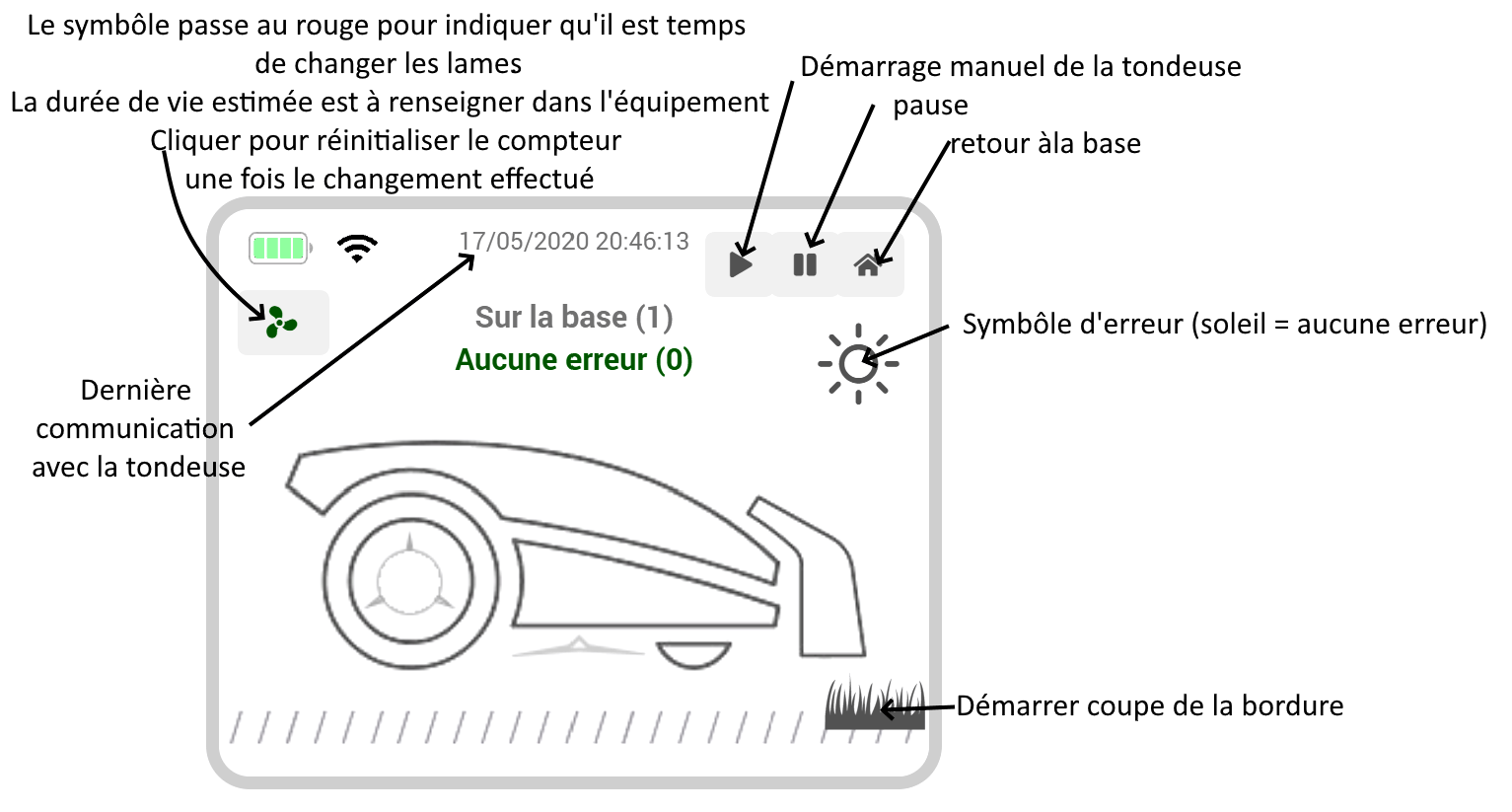
Appendices
List of error codes
- 1: Blocked
- 2: Raised
- 3: Cable not found
- 4: Beyond the Limits
- 5: Rain Delay
- 6: Close the hood to mow
- 7: Close the cover to return to the base
- 8: Blind motor jammed
- 9: Wheel motor locked
- 10: Timeout after a lockup
- 11: Reversed
- 12: Low battery
- 13: Reversed cable
- 14: Battery charging error
- 15: Station search timeout
- 16: Locked
- 17: Battery temperature error
- 18: Mock-up
- 19: Battery compartment opening time limit exceeded
- 20: Finding the Cable
- 21: message number
- 100: Error docking at the charging station
- 101: HBI error
- 102: OTA error
- 103: Card error
- 104: Excessive slope
- 105: Inaccessible area
- 106: Charging station inaccessible
- 108: Insufficient sensor data
- 109: Training startup rejected
- 110: Camera error
- 111: Map exploration required
- 112: Map exploration failed
- 113: RFID reader error
- 114: Headlight error
- 115: Missing charging station
- 116: Blade height adjustment stuck
List of status codes
- 0: Inactive
- 1: Based on
- 2: Startup Sequence
- 3: Leave the base
- 4: Follow the cable
- 5: Searching the database
- 6: Finding the Cable
- 7: Mowing in progress
- 8: Raised
- 9: Stuck
- 10: Jammed slats
- 11: Debug
- 12: Remote Control
- 13: Digital Fence Output
- 30: Back to Basics
- 31: Creating mowing zones
- 32: Trim the border
- 33: Start mowing area
- 34: Pause
- 103: Zone Search
- 104: Searching the Database
- 110: Crossing a boundary
- 111: Discovering the Lawn
FAQ
How often is the data updated?
Data is available in real time. There is no set delay, so it depends on whether the mower is sending information or not; This will happen several times a minute while mowing, and there may be no updates overnight…
Which models are compatible?
It is not possible to list all compatible models; in general, any model with Wi-Fi and compatible with the Worx cloud will be compatible with the plugin.
Change log
Support
If you’re having a problem, start by reading the latest threads related to the plugin on community.
If you still can’t find an answer to your question, feel free to create a new thread—and don’t forget to include the plugin tag (plugin-worxLandroidS).
At a minimum, you must provide:
- a screenshot of the Jeedom Health page
- a screenshot of the plugin’s settings page
- All available plugin logs at the INFO level, pasted into
Preformatted Text(use the</>button on the community), no files! - Depending on the situation, a screenshot of the error encountered, a screenshot of the problematic configuration…
Do you like the plugin?
